Can't Claim Your Knowledge Panel? Fixes for Every Error
The claim button is missing, the sign-in fails, or the panel isn't even yours. Here's what each error means, what Google's help pages say to do, and what Google's Product Experts have told people in the same spot.
You can't claim your Google Knowledge Panel when Google can't connect the account you're signed in with to a profile it already links to you, when the panel isn't claimable yet, or when it isn't really your panel. Each error message points to one of those causes, and each has a specific fix in Google's own Knowledge Panel Help. This guide takes them one at a time.
If you haven't started yet, the normal route is in How to Claim and Edit Your Knowledge Panel. This page is for when that route stops working. For every situation below, we've gone back to Google's help pages and to the threads in Google's own help community where a Product Expert answered, and we say which is which. Product Experts are experienced volunteers, not Google employees.
Why can't you claim your knowledge panel?
Start by matching what you see on screen to one of the rows below. Every fix in the table comes from Google's Knowledge Panel Help, which lists the claim steps, the troubleshooting cases and the Account Recovery process on one page1.
| What you see | What it usually means | First fix |
|---|---|---|
| No “Claim this knowledge panel” button | No panel, a Business Profile, a panel that isn't claimable yet, or you already claimed it | Check which of the four applies, then use Feedback meanwhile |
| “Couldn't verify you. Make sure you're using the correct account…” | The Google Account you're in isn't linked to the profile you picked | Switch accounts, check Search Console ownership or YouTube ownership |
| Only sites you can't sign in to are listed | Google links the panel to profiles you don't control | Take control of one, or contact Google about the wrong profiles |
| Asked for more information or ID, then nothing | Google couldn't find any linked profile | Keep one case ID and follow up on it |
| “Someone is already managing the account” | Another account holds the claim, sometimes your own old one | Check your team, then Account Recovery |
| The panel is about someone else with your name | It's a namesake's entity, or a blend of two people | Report it, don't claim it |
| Claimed, but no “Suggest edits” | Wrong account, or Web & App Activity is off | Sign in with the verified account and turn activity on |
Source: Google Knowledge Panel Help1 and Google help community threads
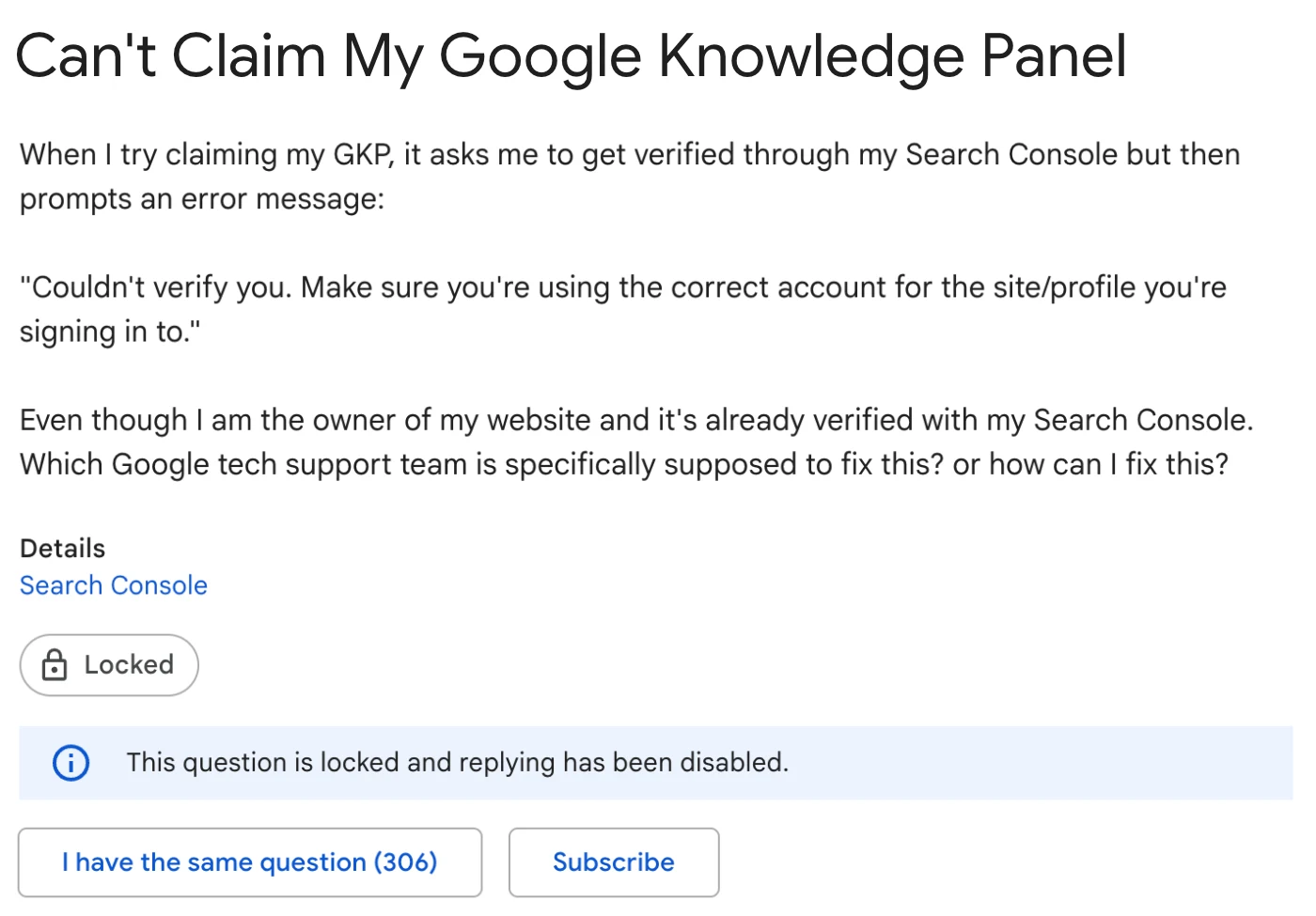
How common are these problems? Google's help community lets readers click “I have the same question” on a thread. We counted those clicks on the main claim threads on 17 Nov 2026. At the time of writing, the single largest, about the “Couldn't verify you” message, had 3062.
| Item | Value |
|---|---|
| “Couldn't verify you” error | 306 |
| ID uploaded, still not verified | 132 |
| Claimed, but no Suggest edits | 31 |
| No claim button | 30 |
| Panel vanished during ID review | 9 |
| Claimed by someone else | 6 |
| Namesake shows instead | 4 |
Source: Google help community threads, counted 17 Nov 20262345678
These are counts of frustrated people on a handful of threads, not a survey. They do show where people get stuck: at the sign-in step, far more than anywhere else.
What if there's no claim button?
The button usually sits at the bottom of the panel, sometimes in the “About” section, and on mobile under the panel's menu1. If you can't find it in any of those places, one of four things is going on.
There's no knowledge panel, or it's a Business Profile
You can only claim a panel that exists. If your name brings up a list of links and nothing else, there's nothing to claim yet, and the work is getting Google to recognise you. How to Get a Google Knowledge Panel covers that.
If the box shows opening hours, directions or reviews, it's a Google Business Profile. Google says the two look alike, but Business Profiles are for businesses serving customers at a location or in a service area, and they're claimed through Google Business Profile instead1. In one community thread, a Platinum Product Expert's first question to someone who couldn't claim was exactly this: did they mean a knowledge panel or a local business listing9? Our guide to knowledge panels versus Business Profiles shows how to tell them apart.
The panel isn't claimable yet
Google says plainly that “not all knowledge panels are claimable as of now” and suggests checking periodically for the button1. It gives no reasons and no timeline. Nothing you submit unlocks it.
In the meantime you aren't stuck. Anyone can use the Feedback link at the bottom of a panel to suggest a correction10. Google says it can prioritise feedback from verified people11, so unverified suggestions may take longer, but they still go in.
You've already claimed it
This catches people out. One user in Google's help community posted that their panel had no claim button, only to learn it had been verified long before5. Once you're verified and signed in with that account, you should see “Suggest edits” at the top of the panel instead11. If you see neither, jump to the section on missing Suggest edits below.
What does “Couldn't verify you” mean?
This is the error people report most. The full message reads: “Couldn't verify you. Make sure you're using the correct account for the site/profile you're signing in to.” It appears after you pick one of the profiles Google lists and sign in2.
Google's help page calls this an associated account error. Its advice is to make sure you're using the correct Google Account for the site or profile1. In practice, four mismatches cause most of it.
You're in the wrong Google Account
Browsers quietly juggle several Google Accounts. The claim flow uses whichever one is active, which may be a work account while your YouTube channel sits on a personal one. In the most-followed thread on this error, the first thing a Diamond Product Expert asked was whether the same account was being used to claim the panel as in Search Console2. Sign out of every account, or open a fresh browser profile, and sign in only with the account that owns the profile you're about to choose.
You're a Search Console user, not an owner
Search Console has owners and users. Only owners, either verified with a token such as an HTML file or delegated by another owner, have full control. Full users and restricted users don't12. If an agency or web developer set up your site's Search Console and added you as a user, signing in won't prove you own the site.
Check under Settings, then Users and permissions12. If you're not listed as an owner, ask the current owner to make you one, or verify ownership yourself. Google's help page puts it in two steps: add the official website to Search Console, then add a site owner1.
Someone else owns the YouTube channel
Each YouTube channel can only have one owner, and only that owner can transfer it1. Being a manager or editor on the channel isn't the same. If your producer or a former agency created the channel, either have them transfer ownership or choose a different profile to verify with.
The X or Facebook profile isn't the one Google links
Google will only accept the official profiles it already associates with the panel. A second account, a fan page or a company page won't help. Google also stores the link automatically when you verify through X or Facebook, and you can remove it later through Webmaster Central1.
Sign out of every Google Account
Or open a new browser profile with no other accounts signed in.
Pick the profile you control most fully
Usually your website through Search Console, or a YouTube channel you own outright.
Confirm your role on it
Owner in Search Console under Users and permissions. Owner, not manager, on YouTube.
Sign in to Google with that exact account
The account that owns the profile, nothing else.
Start the claim again
Search your name, click Claim this knowledge panel and choose that profile.
Still failing? Contact Google
Use the Contact us route described further down, and say which checks you've already done.
What if every check passes and the error still appears? Some users in that thread did exactly this, sent screenshots from several browsers to support, and still waited2. The recommended answer came from a Diamond Product Expert who had raised it with Google's team: contact the Knowledge Panel team directly through the help page's Contact us flow2. More on that below.
What if Google only lists sites you can't sign in to?
Sometimes Google offers to verify you through profiles that aren't yours to log in to. In one thread, a professional who had changed careers found that Google listed only the sites of former employers13. A Product Expert's reply pointed to the Knowledge Panel Help Center and its Contact us options13.
That makes sense once you know where the list comes from. Google offers the profiles its systems already tie to the panel. If an employer's page is the strongest link, that's what it shows. Two things help:
- Take control of a profile Google accepts. Make sure your own website, YouTube channel, X or Facebook profile is clearly yours and links to and from your main site, so Google has an official profile it can link to you. This is slow, but it's the lasting fix.
- Contact Google about the wrong profiles. A panel “showing the wrong websites or profiles” is one of the cases Google's help page tells you to contact it about1. Explain which listed sites aren't yours and which official profiles are.
What if verification asks for ID, or gets rejected?
Google's knowledge panel help doesn't describe what the “provide more information” check involves today1. Older community threads show people being asked for photos of ID documents, including a photo of themselves holding it6. A thread from one user who uploaded handles, documents and ID and still wasn't verified had 132 “same question” clicks when we checked on 17 Nov 2026, and no replies at all3.
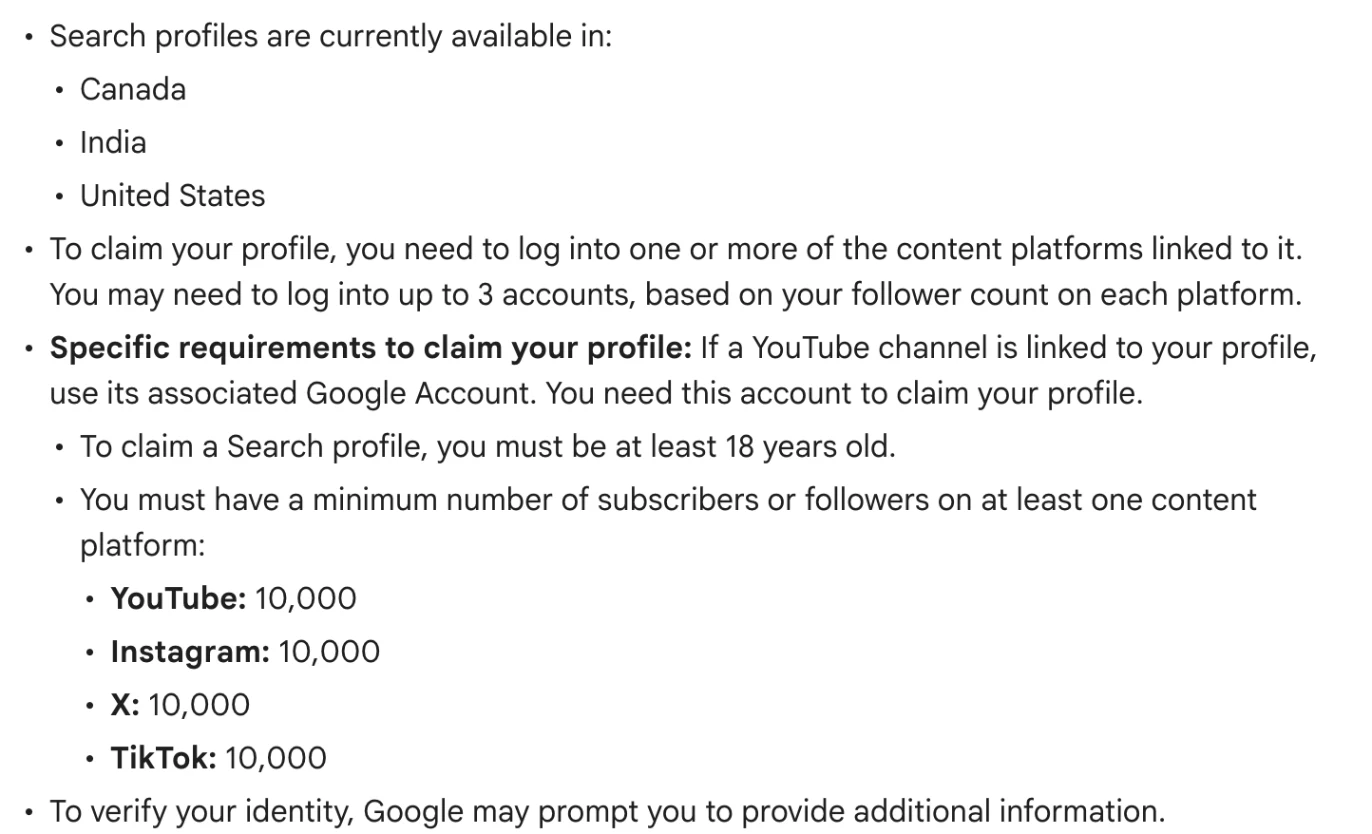
Google does document an identity check for a related product. A Search profile is a newer page Google may generate for creators, publishers and brands that already have a knowledge panel. Claiming it can involve a “Selfie with ID” step and supporting documents. The requirements are steep for most professionals: you must be at least 18, have at least 10,000 subscribers or followers on at least one of YouTube, Instagram, X or TikTok, and you may need to sign in to up to 3 accounts14. When we checked on 17 Nov 2026, Google's help page listed Canada, India and the United States as the countries where Search profiles are available14.
If you sent documents and nothing has happened, keep to one support case. In a thread from someone whose panel disappeared while their ID was under review, a Product Expert checked with Google's team. The team's advice was to contact Knowledge Panel support and quote the existing case ID6. A single case also keeps your documents and history in one place.
What does “Someone is already managing the account” mean?
It means another Google Account holds the claim. That other account might be yours. Google notes that you can still see the claim option after you've claimed a panel, and clicking it shows this message1. Sign in with the email you used to verify, then use Feedback to suggest changes. Google says signing in that way gets your feedback priority1.
If it really is someone else, check with your organisation, your publicist and any agency that might have claimed it for you. If nobody has it, Google's fix is Account Recovery through Knowledge Panel support. You allow Google to share your email address with the current owners or managers. Google then waits 3 business days. If they approve, you're added. If they don't respond, “the knowledge panel will become claimable again”1.
When the claim is held by someone with no right to it, such as an unofficial site, a Diamond Product Expert pointed to Google's page on how the Knowledge Graph works7. That page explains that the subject or an official representative can claim a panel, and that anyone can report problems through the feedback options15. Use Account Recovery and say why the current holder isn't an official representative. The roles and ownership transfer are covered in the claim and edit guide.
What if the panel is about someone with your name?
You can't claim it, and you shouldn't try. You can only verify a panel about you or an entity you represent10. Google's troubleshooting list covers two versions of this. Either the panel's content is mixed with someone of the same or a similar name, or it shows the wrong websites or profiles1. Both go to Google's contact options, not the claim flow.
There's a subtler version too. A verified user posted that their claimed panel didn't show the way they expected for their name. A Product Expert's recommended answer was that more than one well-known person shares that name. Google is careful about picking one over the other, especially on mobile where space is tight, and whether a panel appears is mostly outside your control8.
So the fix is to make you easier to tell apart:
- Search your name the way prospects do. Try your name plus your profession or city. The name search checklist lists what to look at.
- Report blended facts one by one. Use Feedback to flag each wrong fact, with public links that show the right version.
- Use the same distinguishing details everywhere. The same middle initial, job title, firm and city on your website, LinkedIn and speaker pages give Google something to separate you by.
- Ask for a better name only with strong evidence. Google's policy allows a change to names, titles, descriptions and images “when supported by strong evidence that our automated systems have not made the most representative selection”15.
Claimed, but “Suggest edits” is missing or the panel vanished?
Two problems turn up after a successful claim.
“Suggest edits” doesn't appear
Google lists the conditions. You must be signed in with the same Google Account you used to verify, that account must be verified to represent the panel, and Web & App Activity must be turned on11. In a thread with 31 “same question” clicks at the time of writing, Product Experts pointed a user to the Feedback link, asked them to check Web & App Activity, and said that only Google's Knowledge Panel team, reached through its help contact page, could resolve the problem4.
The panel disappeared after you claimed it
This one hurts, and Google's answer is blunt. Its help page says automated systems decide when, where and how a query shows a panel, and that this “isn't something we can or would influence”15. A user whose panel vanished after verification posted the reply they got from Google's Knowledge Panel support team, which said much the same thing16. Google also says its current policy is not to manually create or delete knowledge panels11.
There's no support ticket for this. The way back is the same as the way in: clear, consistent, corroborated information about you across the web.
Google support can switch my knowledge panel back on.
Google says its automated systems decide when panels appear, and it doesn't manually create or delete them.
How do you contact Google about a claim problem?
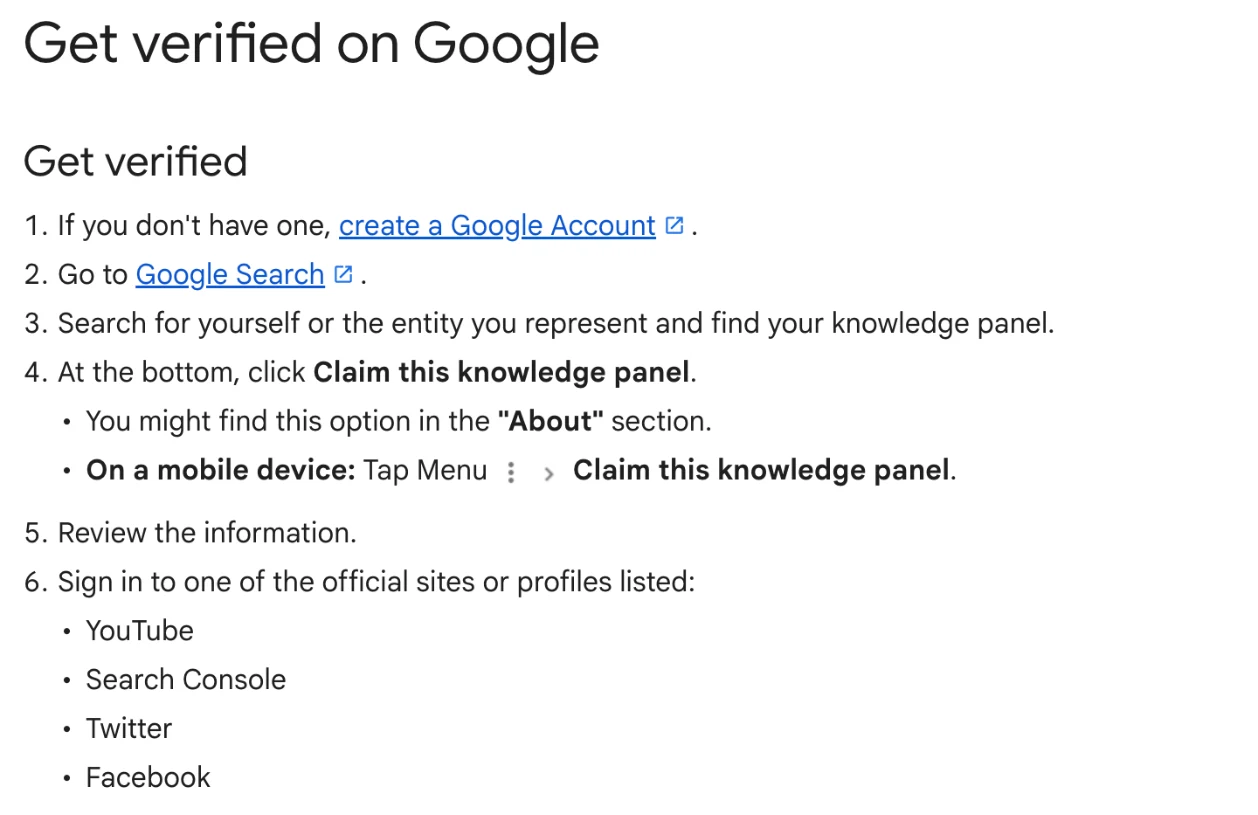
The route most Product Experts point to is the Contact us link on Google's Get verified help page. The Diamond Product Expert who raised the “Couldn't verify you” problem with Google's team passed on their instructions. Go to the Get verified page, scroll to the bottom, click Contact us, and follow the flow past the suggested help articles to the step where you can email the team directly2.
Copy the panel's share link
Search your name, open the panel's Share option and copy the link to that specific panel.
Write down the exact error
Copy it word for word, for example “Couldn't verify you. Make sure you're using the correct account…”.
List what you've already checked
Which Google Account, which profile you chose, your role on it (Search Console owner, YouTube owner) and the browsers you tried.
Open the Contact us flow
From the bottom of Google's Get verified help page, follow it through to the email step.
Keep one case ID
Reply on the same case rather than opening new ones.
The share link matters. Google's help page explains how to copy a panel's specific link from its Share option15, and it points the team to the exact panel rather than to a page of search results. Product Experts in the forums can sometimes pass a well-documented case to Google, but there's no private one-to-one support there2.
Where to start
Most claim errors are account problems, and you can fix them in an afternoon. Sign out of everything, sign in with the account that owns your website in Search Console or owns your YouTube channel outright, and try again. If the button is missing, check whether you're looking at a Business Profile, a panel you've already claimed, or one Google hasn't made claimable. If the panel belongs to someone else with your name, report it rather than fighting it.
Errors that come back after all of that usually point to the same thing: Google isn't yet sure which profiles and facts belong to you. That's a job for your website, your bio and the sources that describe you. Start with the free Knowledge Panel Checker to see what Google holds, browse more knowledge panel guides, and if you'd like someone to look at a stubborn case with you, book a free audit.
Frequently asked questions
Why can't I claim my Google knowledge panel?
Usually for one of five reasons: there is no panel yet or the box is a Google Business Profile, the panel isn't claimable yet, you're signed in to a Google Account that isn't linked to the YouTube channel, Search Console property, X or Facebook profile Google lists, someone else already manages it, or the panel belongs to a namesake. Each has a different fix.
What does “Couldn’t verify you. Make sure you’re using the correct account” mean?
Google couldn't match the account you signed in with to the site or profile it associates with the panel. Check you're in the right Google Account, that you're an owner (not just a user) of the website in Search Console, and that you own the YouTube channel rather than manage it. If everything matches and it still fails, contact the Knowledge Panel team from the Contact us link on Google's Get verified help page.
Why is there no “Claim this knowledge panel” button?
Google says not all knowledge panels are claimable yet and suggests checking back periodically. The button is also absent when there's no panel, when the box is a Google Business Profile, or when you've already claimed it and are signed in, in which case you'll see Suggest edits instead. You can still send corrections through the Feedback link in the meantime.
What if someone else already claimed my knowledge panel?
Ask your team, publicist and any past agency first. If nobody has it, start Account Recovery with Google's Knowledge Panel support. Google emails the current owners and waits 3 business days; if they don't respond, the panel becomes claimable again.
Can I claim a knowledge panel that's about someone with my name?
No. You can only claim a panel about you or an entity you represent. If a namesake's panel shows for your name, or a panel mixes your details with theirs, report it through Google's Knowledge Panel contact options and make your own identity easier for Google to tell apart.
Can I make Google create or restore my knowledge panel?
No. Google says its current policy is not to manually create or delete knowledge panels, and that its automated systems decide when a panel appears. A panel that disappears after you claim it isn't something Google support will switch back on.
How do I contact Google about a knowledge panel claim problem?
Open Google's Get verified on Google help page, scroll to the bottom, click Contact us and follow the flow past the help articles until you can email the Knowledge Panel team. Include the panel's share link, the exact error and which account and profiles you tried.
Sources
- 1Get verified on GoogleGoogle Knowledge Panel Help · Accessed 17 Nov 2026↩
- 2Can't Claim My Google Knowledge Panel (thread, recommended answer by a Diamond Product Expert, 29 Jan 2024)Google Search Central Community · Aug 2023, accessed 17 Nov 2026↩
- 3knowledge panel (thread about failed ID verification)Google Account Community · Aug 2022, accessed 17 Nov 2026↩
- 4About Knowledge Panel (thread about a missing Suggest edits option)Google Search Community · Oct 2022, accessed 17 Nov 2026↩
- 5There is no “Claim Knowledge Panel” Button beneath my Panel (thread)Google Search Central Community · Oct 2019, accessed 17 Nov 2026↩
- 6Requested to claim a knowledge panel, but in the meanwhile the knowledge panel disappeared (thread)Google Search Community · Jul 2020, accessed 17 Nov 2026↩
- 7knowledge panel claimed by someone else (thread, Diamond Product Expert reply)Google Search Central Community · Jun 2023, accessed 17 Nov 2026↩
- 8I've claimed my Knowledge Panel, but it doesn't appear the way it should (thread)Google Search Central Community · Sep 2023, accessed 17 Nov 2026↩
- 9I am Unable to claim my Knowledge panel in google (thread, Platinum Product Expert reply)Google Business Profile Community · Feb 2024, accessed 17 Nov 2026↩
- 10About knowledge panelsGoogle Knowledge Panel Help · Accessed 17 Nov 2026↩
- 11Submit feedback on content about youGoogle Knowledge Panel Help · Accessed 17 Nov 2026↩
- 12Managing owners, users, and permissionsSearch Console Help · Accessed 17 Nov 2026↩
- 13Verifying my account & Claiming Knowledge Panel (thread)Google Search Community · Aug 2023, accessed 17 Nov 2026↩
- 14Claim an existing Search profileGoogle Search Help · Accessed 17 Nov 2026↩
- 15How Google's Knowledge Graph worksGoogle Knowledge Panel Help · Accessed 17 Nov 2026↩
- 16My knowledge panel disappeared after I got verified and claimed it (thread)Google Search Central Community · Feb 2021, accessed 17 Nov 2026↩
Keep reading
 Knowledge PanelsIs a Google Knowledge Panel Worth It for a Founder?Shobin K Jose · 18 Nov 2026 · 11 min read
 Knowledge PanelsCan Anyone Get a Google Knowledge Panel? How Google DecidesShobin K Jose · 17 Nov 2026 · 16 min read
 Knowledge PanelsHow Much Does a Google Knowledge Panel Cost? DIY vs Done for YouShobin K Jose · 17 Nov 2026 · 13 min read